

1. Bitbake
Bitbake is the build engine. It reads instructions(recipes) and builds a full Linux system from source. It’s commoly used in the Yocto project to create custom Linux distributions. Bitbake processes recipes, which specify how to fetch, configure, compile, and package software components, enabling reproducible and customizable builds.
2. Terminlology
Terminology in the Yocto Project can be a little confusing. These definitions should help you along the way:
- OpenEmbedded: build system and community
- The Yocto Project: umbrella project and community
- Metadata: files containing information about how to build an image
- Recipe: file with instructions to build one or more packages
- Layer: directory containing grouped metadata (start with “meta-”)
- Board support package (BSP): layer that defines how to build for board (usually maintained by vendor)
- Distribution: specific implementation of Linux (kernel version, rootfs, etc.)
- Machine: defines the architecture, pins, buses, BSP, etc.
- Image: output of build process (bootable and executable Linux OS)
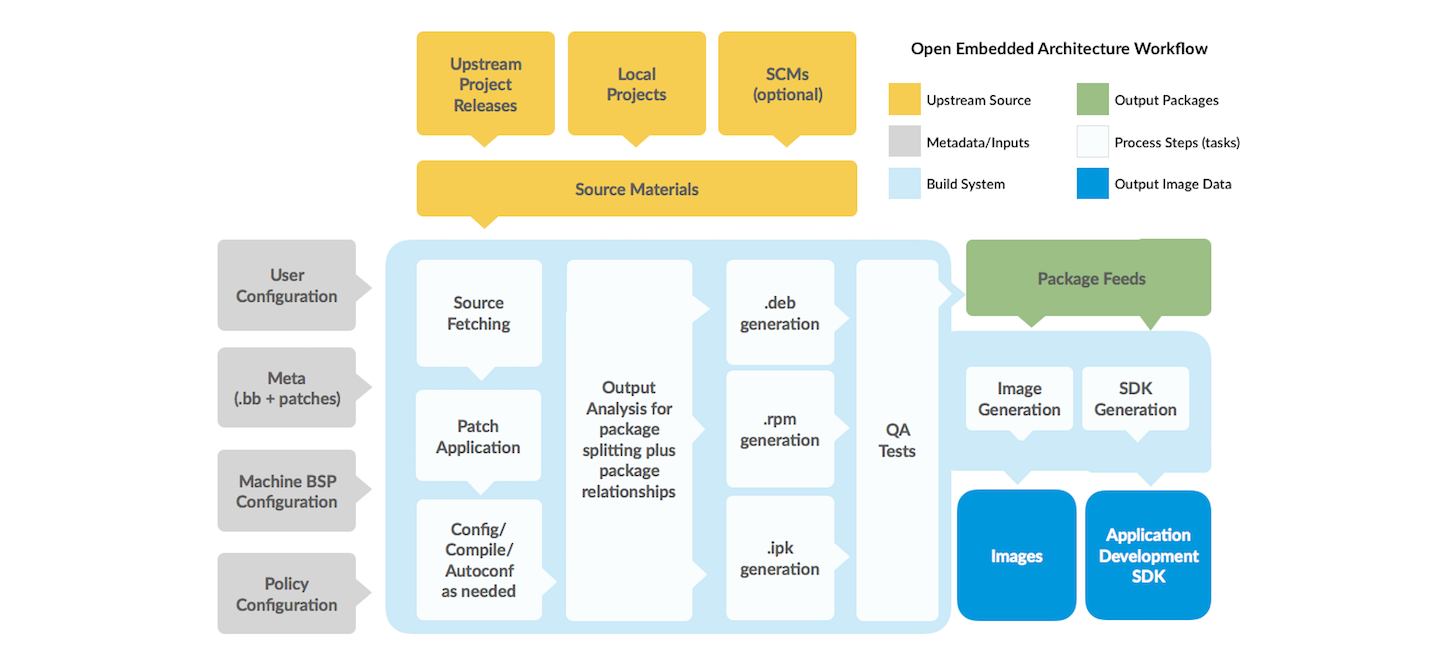
3. Block Diagram
4. Must to Know Commands
4.1 Basic Yocto Build Setup and Commands
You must setup the build environment before building it.
1 | source oe-init-build-env |
Build an image.
1 | bitbake <image-name> |
Remove just only build ouput(artifacts).
1 | bitbake -c clean <recipe-name> |
Remove build output + sstate cache
1 | bitbake -c cleansstate <recipe-name> |
Remove build output + sstate cache + downloaded source code
1 | bitbake -c cleanall <recipe-name> |
Compiling the recipe.
1 | bitbake -c complile <recipe-name> |
Configuring the recipe.
1 | bitbake -c configure <recipe-name> |
List layers used in your current build environment.
1 | bitbake-layers show-layers |
Add new layer to you current build environment.
1 | bitbake-layers add-layer <layer-name> |
4.2 Package Management
List available recipes and it’s version.
1 | bitbake -s |
4.3 Troubleshooting and Debugging
Bitbake server stuck issue.
1 | pkill -f "bitbake.*server" || true |
Show environment variables used for the recipe.
1 | bitbake -e <recipe-name> |
Generates dependency graph.
1 | bitbake -g <recipe-name> |
Start modifying a recipe in workspace
1 | devtool modify <recipe> |
Build a recipe from workspace
1 | devtool build <recipe-name> |
Show the status of the modified recipes
1 | devtool status |
Finalize modification into a layers
1 | devtool finish <recipe-name> <layer-name> |
wic create